How to Scrape Competitor Prices: DIY Tools, Trade-offs, and When to Buy Instead
Scraping a price is easy. Keeping thousands of products matched to the right competitor, every day, is the hard part. A practical guide to the DIY tools — Python libraries, AI scrapers, no-code extensions — when they're the right call, and when they quietly cost more than they save.
If you sell online, you already know your prices aren't set in a vacuum. A competitor drops theirs, a marketplace seller undercuts you, and suddenly your bestseller isn't moving. So you decide to start tracking competitor prices — and the first question is always the same: do you build a scraper yourself, or pay for a tool that does it for you?
This is a practical guide to that decision: how price scraping actually works, the tools that do the job, when building your own is the right call, and the point where it quietly starts costing more than it saves. (We make a pricing tool, so we're not a neutral party — but DIY genuinely wins for some stores, and we'll point out where.)
How price scraping actually works
Every price scraper — whether it's ten lines of Python or a commercial platform — does the same four things.
- Fetch the page. Send a request to a product URL and download its HTML, the same thing your browser does when you open it.
- Render it, if needed. Many modern stores load the price with JavaScript after the page arrives, so the raw HTML is empty where the price should be. To read it, you have to run the page in a real browser engine.
- Extract the data. Pull out the price, currency, and stock status — then normalize it (sale vs. original price, per-unit vs. multipack, AED vs. SAR) so the numbers are comparable.
- Match and monitor. Tie each price to the right product in your own catalog, then repeat on a schedule and track how it moves over time.
Steps one to three are largely a solved problem — good libraries exist and they're free. Step four is where most projects, DIY or not, quietly run into trouble. More on that shortly.
The DIY route: from a browser extension to a full build
How hands-on this gets depends on who's doing the work — and you don't need a developer to try it. Here are the options, roughly easiest first.
Start here if you're not technical: a browser extension. Instant Data Scraper is a free Chrome extension — open a competitor's product page, click the icon, and it pulls the list into a spreadsheet. It's the fastest way to try scraping with your own hands, one page at a time, and see whether the data is even useful before you spend anything. It's lightly maintained and struggles with heavily JavaScript-driven pages, so treat it as a way to experiment, not a monitoring setup.
A step up, still low-code: an API or an AI agent. If clicking page by page gets old, Firecrawl turns a URL — or a whole site — into clean, structured data through an API, and handles the rendering and much of the anti-bot side for you. browser-use points an AI agent at a real browser to follow plain-language instructions like 'find the price on this page.' Both ask for a little comfort with technical tools, but far less than building from scratch.
If you have developers, point them at the proven libraries. This is where the real power — and the real maintenance — lives. Scrapy is a full crawling framework; Playwright and Selenium drive real browsers for JavaScript-heavy sites; and requests with BeautifulSoup is the simple starting point for static pages. These are the tools your engineer will actually want — but they're a project to own, not a quick experiment.
One thing every option past the browser extension has in common: to run on a schedule it needs the same plumbing — rotating proxies so you're not blocked from a single IP, a way past defenses like Cloudflare, and something to re-run it daily. The heavier the setup, the more of that you're on the hook for.
When building your own is the right call
DIY scraping genuinely makes sense in a specific situation. Reach for it when most of these are true:
- You have a developer — you, or someone on the team who's comfortable in Python and won't mind owning this.
- You're tracking a small, fixed set of competitors — a handful of sites, not dozens.
- Those sites are relatively simple and stable — static HTML, prices in the markup, layouts that don't change every quarter.
- You mainly need the raw numbers — a sheet or dashboard of competitor prices — and you'll do the analysis yourself.
- You're okay with the occasional gap — if a scraper breaks for a few days after a redesign, that's an annoyance, not a crisis.
If that's you, build it. You'll save money, keep full control, and the tools above are more than good enough.
Where DIY quietly gets expensive
The real cost of a scraper isn't the afternoon you spend writing it — it's everything after. Two things wear you down, and both get worse the more you scrape.
Sites change, and your scraper doesn't know. A competitor tweaks their page, the selector you relied on stops matching, and your scraper silently returns nothing — or worse, the wrong number. Every redesign is a maintenance ticket, and you usually find out only when a price looks off. Multiply that by every site you track.
And sites are built to stop you — they get better at it as you scale. A one-off scrape of a few pages usually slips through. Run it every day across dozens of competitors and the pushback starts: Cloudflare challenges, CAPTCHAs, rate limits, outright IP bans. Marketplaces like Noon and Amazon are especially good at spotting automated traffic and shutting it out. Staying unblocked turns into its own arms race — rotating proxies, real headless browsers, constant tuning — and when you lose a round, the scraper doesn't fail loudly; it just quietly starts returning blanks, and you're making decisions on data that isn't there.
The hard part: matching products to your catalog
Everything so far is about collecting prices. The harder problem — the one that quietly sinks most DIY projects — is making those prices mean something.
Scraping a price is easy. Knowing that the price you scraped is for the same product you sell is the genuinely hard part — and getting it wrong is worse than not tracking at all, because you end up repricing against the wrong item. Is your '55-inch Samsung 4K TV' the same listing as a competitor's 'Samsung UA55CU7000 Crystal UHD'? A person can tell at a glance; a script matches on text and gets it wrong just often enough that you stop trusting the numbers. Now do that across Arabic titles, mixed Arabic-English listings, bundles, multipacks, and near-identical variants — on every competitor, updated as their catalogs change.
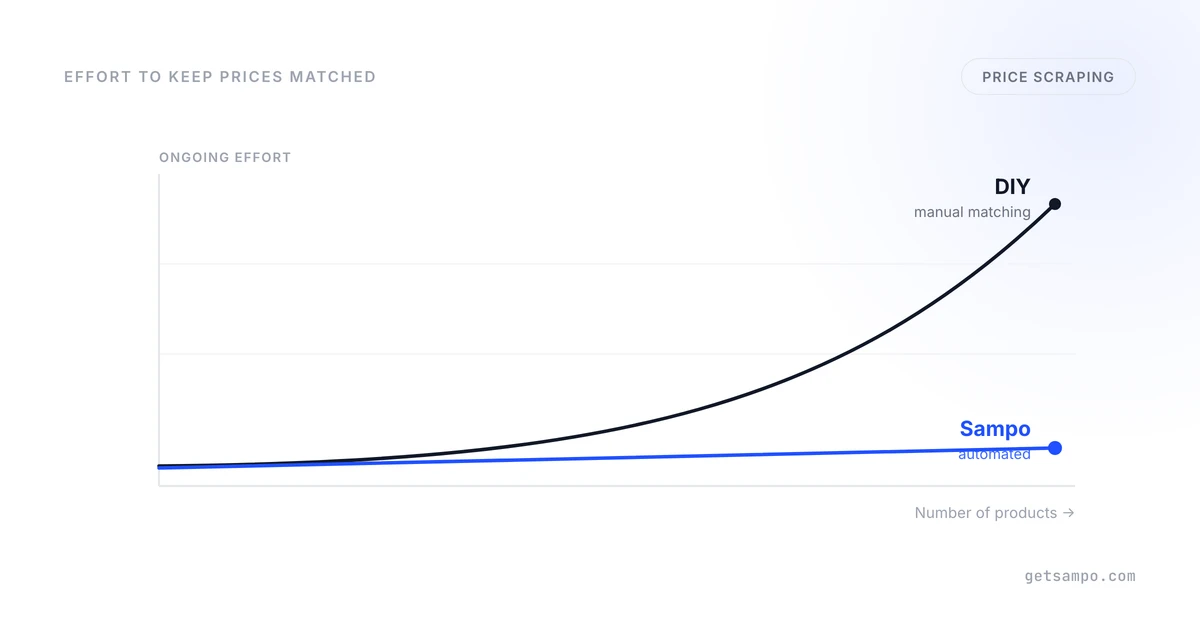
So someone matches products by hand — your SKU to their listing, one by one — and then re-checks those matches as catalogs change. With twenty products, that's a quiet afternoon. With two thousand SKUs across eight competitors, it's a permanent part-time job that never finishes. This is the moment a DIY project usually stops being free: not the scraping — the matching.
And even perfectly matched data is still just data. It doesn't tell you which prices to change, by how much, or whether last week's change actually helped — that thinking is still yours to do.
When a done-for-you tool makes more sense
A managed tool isn't automatically the answer — but it earns its keep once the costs above start to bite. It's usually the better call when:
- You have many SKUs — hundreds or thousands — where manual matching simply doesn't scale.
- You don't have a developer to spare, or you'd rather they worked on your product than on babysitting scrapers.
- You need to cover marketplaces and tough targets — Noon, Amazon.ae/.sa, sites behind Cloudflare — without running your own proxy and browser fleet.
- You're matching across Arabic and mixed-language catalogs, where naive name-matching falls apart.
- You want decisions, not just data — what to charge, and proof it worked — rather than another spreadsheet to interpret.
This is the gap Sampo is built to close: it matches your catalog to competitors automatically — Arabic titles included — keeps the scrapers running when sites change, covers Noon and Amazon, and turns the prices into pricing recommendations you can act on. It's built for Gulf e-commerce specifically, which is where most global tools struggle. We mention it because it's what we build — but the real test is the checklist above, whoever you end up buying from.
A simple way to decide
Strip away the detail and it comes down to two questions: how many products do you need to keep matched, and who's going to maintain it?
- Few products, a developer on hand, simple sites → build it yourself. The free libraries are excellent and you keep full control.
- Many products, no spare engineering time, marketplaces and Arabic in the mix → a managed tool almost always beats the manual-matching treadmill, once you count the hours it really takes.
- Somewhere in between → start with a small DIY scraper for your top few competitors and watch the matching workload. The day it starts eating real hours every week is the day the maths flips.
Either way, the thing to budget for isn't the scraping. It's the matching, the maintenance, and turning data into decisions. Get clear on who owns those three, and the build-or-buy question usually answers itself.
Monitor competitor prices, stock, and promotions hourly with products matched to your catalog.